<?xml version="1.0" encoding="utf-8"?>
<feed xmlns="http://www.w3.org/2005/Atom">
    <title>Ivan Čukić</title>
    <link href="https://cukic.co/feeds/tag-planetkde.xml" rel="self" />
    <link href="https://cukic.co" />
    <id>https://cukic.co/feeds/tag-planetkde.xml</id>
    <author>
        <name>Ivan Čukić</name>
        
    </author>
    <updated>2026-01-17T12:08:00 +0200</updated>
    <entry>
    <title>KDE Ni! OS – Plasma Login Manager now available</title>
    <link href="https://cukic.co/2026/01/16/kde-ni-os-plasma-login-manager-available" />
    <id>https://cukic.co/2026/01/16/kde-ni-os-plasma-login-manager-available</id>
    <published>2026-01-16T23:45:00 +0200</published>
    <updated>2026-01-17T12:08:00 +0200</updated>
    <summary type="html"><![CDATA[<div class="sidebar-paragraph"
style="display: flex; align-items: center; border: 1px solid #ccc; border-radius: 4px 4px 4px 4px; padding: 0 0.5em; padding-left: 0; background: linear-gradient(to right, #cecece 0 58px, transparent 58px); margin-bottom: 2.5em !important;">
<p><img src="/resources/images/sidebar-icons/kde-ni-os.svg"
class="sidebar-image"
style="margin-right: 0.5em; width: 57px !important; max-width: 57px !important;"
alt="Sidebar" /></p>
<p> <a href="https://invent.kde.org/ivan/kde-ni-os/" target="_blank"
rel="noopener noreferrer">KDE Ni! OS</a> is a custom flavour
(configuration, not a separate distribution) of <a
href="https://nixos.org" target="_blank"
rel="noopener noreferrer">NixOS</a> that showcases KDE software. It
builds on NixOS with the aim to reimplement the same features other
popular immutable distributions have, while providing a first-class KDE
Plasma setup.</p>
</div>
<p>The Plasma Login Manager support has been <a
href="https://invent.kde.org/ivan/kde-ni-os/-/merge_requests/2"
target="_blank" rel="noopener noreferrer">merged</a> into Ni! OS.</p>
<p>If you want to use it, there are two prerequisites:</p>
<ol type="1">
<li>you are using Wayland, not X11; and</li>
<li>you are on unstable NixOS.</li>
</ol>
<p>It is in the <em>“works for me”</em> state. I don’t use auto-login,
virtual keyboard, etc.</p>
<h2 id="going-unstable">Going unstable</h2>
<p>If you are on the <em>stable</em> channel, which would surprise me as
you’re reading this post, it is easy to switch to <em>unstable</em> just
by running these commands as <code>root</code> user (<code>sudo</code>,
or <code>su</code>, or…).</p>
<div class="sourceCode" id="cb1"><pre class="sourceCode sh"><code class="sourceCode bash"><span id="cb1-1"><a href="#cb1-1" aria-hidden="true" tabindex="-1"></a><span class="ex">nix-channel</span> <span class="at">--add</span> https://channels.nixos.org/nixos-unstable nixos</span>
<span id="cb1-2"><a href="#cb1-2" aria-hidden="true" tabindex="-1"></a><span class="ex">nix-channel</span> <span class="at">--update</span></span>
<span id="cb1-3"><a href="#cb1-3" aria-hidden="true" tabindex="-1"></a><span class="ex">nixos-rebuild</span> switch <span class="at">--upgrade</span> </span></code></pre></div>
<p>This will switch you to the unstable version of NixOS.</p>
<p>Mind that, as NixOS is an immutable distribution, you can easily boot
back into the stable version – the previous version of your system is
still accessible in the bootloader menu.</p>
<h2 id="switching-from-sddm-to-the-plasma-login-manager">Switching from
SDDM to the Plasma Login Manager</h2>
<p>There’s a new option in Ni! OS called <a
href="https://invent.kde.org/ivan/kde-ni-os/-/blob/master/etc_nixos/definitions.nix?ref_type=heads#L24"
target="_blank"
rel="noopener noreferrer"><code>experimental.use_plasma_login_manager</code></a>.
The only thing you need to do in order to switch from SDDM to the Plasma
Login Manager is to set it to <code>true</code>, and just
<code>switch</code> your setup to the new configuration with:</p>
<div class="sourceCode" id="cb2"><pre class="sourceCode sh"><code class="sourceCode bash"><span id="cb2-1"><a href="#cb2-1" aria-hidden="true" tabindex="-1"></a><span class="ex">nixos-rebuild</span> switch</span></code></pre></div>
<figure>
<a href='/content/images/2026-01-13-kde-ni-os-plasma-login-manager.png'><img src='/content/images-small/2026-01-13-kde-ni-os-plasma-login-manager.png' alt='Plasma Login Manager on Ni! OS' /></a>
<figcaption>Plasma Login Manager on Ni! OS</figcaption>
</figure>
<p>Switching back is also trivial – just change the value back to
<code>false</code> and do the <code>switch</code> again.</p>
<h2 id="there-and-back-again">There and back again</h2>
<p>One new thing in Ni! OS is a custom label for the versions of the
system (derivations in NixOS terminology).</p>
<p>If you enable an experimental feature such as the Plasma Login
Manager, the label will clearly denote that. It makes it easy to get
back to a version without the experimental features enabled.</p>
<p>As you can see in the following screenshot, the default label is
<code>kde-ni-os</code> and all enabled experimental features are
appended to it – when enabling the Plasma Login Manager, the label
becomes <code>kde-ni-os:plasma-login-manager</code>. These labels can be
seen in the following screenshot:</p>
<figure>
<a href='/content/images/2026-01-16-kde-ni-os-plasma-login-manager-boot.png'><img src='/content/images-small/2026-01-16-kde-ni-os-plasma-login-manager-boot.png' alt='Boot menu with labels shown' /></a>
<figcaption>Boot menu with labels shown</figcaption>
</figure>
<h2 id="edit-upstream">[edit] Upstream</h2>
<p>Was notified by NixOS KDE maintainer K900, that PLM will officially
become a part of nixpkgs as Plasma 6.5.5 gets updated to 6.6.</p>
<p>You can follow the progress of the patch <a
href="https://github.com/NixOS/nixpkgs/pull/479797" target="_blank"
rel="noopener noreferrer">here</a>.</p>
<p>Once Plasma 6.6 is released, and it becomes available in nixpkgs, Ni!
OS will start using the official package instead of my local
<em>hack</em>.</p>

<!--
<div class="patronage">
<hr />
You can support my work on <a href="https://www.patreon.com/bePatron?u=9289140">Patreon</a>,
or you can get my book <a href="https://cukic.co/to/fp-in-cpp">Functional Programming in C++ at Manning</a> if you're into that sort of thing.
</div>
-->

]]></summary>
</entry>
<entry>
    <title>KDE Ni! OS – Plasma Login Manager teaser</title>
    <link href="https://cukic.co/2026/01/13/kde-ni-os-plasma-login-manager" />
    <id>https://cukic.co/2026/01/13/kde-ni-os-plasma-login-manager</id>
    <published>2026-01-13T20:35:00 +0200</published>
    <updated>2026-01-13T22:45:00 +0200</updated>
    <summary type="html"><![CDATA[<div class="sidebar-paragraph"
style="display: flex; align-items: center; border: 1px solid #ccc; border-radius: 4px 4px 4px 4px; padding: 0 0.5em; padding-left: 0; background: linear-gradient(to right, #cecece 0 58px, transparent 58px); margin-bottom: 2.5em !important;">
<p><img src="/resources/images/sidebar-icons/kde-ni-os.svg"
class="sidebar-image"
style="margin-right: 0.5em; width: 57px !important; max-width: 57px !important;"
alt="Sidebar" /></p>
<p> <a href="https://invent.kde.org/ivan/kde-ni-os/" target="_blank"
rel="noopener noreferrer">KDE Ni! OS</a> is a custom flavour
(configuration, not a separate distribution) of <a
href="https://nixos.org" target="_blank"
rel="noopener noreferrer">NixOS</a> that showcases KDE software. It
builds on NixOS with the aim to reimplement the same features other
popular immutable distributions have, while providing a first-class KDE
Plasma setup.</p>
</div>
<p>Just a teaser this time.</p>
<p>I’ve read somewhere that Fedora will be the first distribution to
replace SDDM with Dave’s brand new Plasma Login Manager.</p>
<p>Will Ni! OS be the first non-distribution to do the same?</p>
<p>And if it does, will it become a distribution as it distributes yet
another package not available in vanilla NixOS? :)</p>
<figure>
<a href='/content/images/2026-01-13-kde-ni-os-plasma-login-manager.png'><img src='/content/images-small/2026-01-13-kde-ni-os-plasma-login-manager.png' alt='Plasma Login Manager on Ni! OS' /></a>
<figcaption>Plasma Login Manager on Ni! OS</figcaption>
</figure>

<!--
<div class="patronage">
<hr />
You can support my work on <a href="https://www.patreon.com/bePatron?u=9289140">Patreon</a>,
or you can get my book <a href="https://cukic.co/to/fp-in-cpp">Functional Programming in C++ at Manning</a> if you're into that sort of thing.
</div>
-->

]]></summary>
</entry>
<entry>
    <title>KDE Ni! OS – installing packages from source – Plasma Pass</title>
    <link href="https://cukic.co/2026/01/03/kde-ni-os-install-packages-from-source" />
    <id>https://cukic.co/2026/01/03/kde-ni-os-install-packages-from-source</id>
    <published>2026-01-03T20:30:00 +0200</published>
    <updated>2026-01-04T19:35:00 +0200</updated>
    <summary type="html"><![CDATA[<div class="sidebar-paragraph"
style="display: flex; align-items: center; border: 1px solid #ccc; border-radius: 4px 4px 4px 4px; padding: 0 0.5em; padding-left: 0; background: linear-gradient(to right, #cecece 0 58px, transparent 58px); margin-bottom: 2.5em !important;">
<p><img src="/resources/images/sidebar-icons/kde-ni-os.svg"
class="sidebar-image"
style="margin-right: 0.5em; width: 57px !important; max-width: 57px !important;"
alt="Sidebar" /></p>
<p> <a href="https://invent.kde.org/ivan/kde-ni-os/" target="_blank"
rel="noopener noreferrer">KDE Ni! OS</a> is a custom flavour
(configuration, not a separate distribution) of <a
href="https://nixos.org" target="_blank"
rel="noopener noreferrer">NixOS</a> that showcases KDE software. It
builds on NixOS with the aim to reimplement the same features other
popular immutable distributions have, while providing a first-class KDE
Plasma setup.</p>
</div>
<p>This post will show the <em>NixOS</em> way of adding a custom package
and explain the benefits of this approach in the context of system
immutability.</p>
<h2 id="plasma-pass">Plasma Pass</h2>
<p>KDE Ni! OS recently got a new package installed by default – Daniel
Vrátil’s Plasma Pass applet.</p>
<p>Plasma Pass is a Plasma applet to access passwords from
<code>pass</code>, the standard UNIX password manager. You can find more
information about the applet in Dan’s <a
href="https://www.dvratil.cz/2018/05/plasma-pass/" target="_blank"
rel="noopener noreferrer">blog post</a>.</p>
<p>As NixOS doesn’t currently offer Plasma Pass in its repositories, the
package is installed in Ni! OS from the sources as in some other
<em>BTW, I use …</em> distributions.</p>
<p>In NixOS, this is easily done via overlays. We can create an overlay
that defines the <code>plasma-pass</code> package so that it can be
installed as if it were a real NixOS package.</p>
<h3 id="package-definition">Package definition</h3>
<p>This is the overlay definition used in Ni! (<a
href="https://invent.kde.org/ivan/kde-ni-os/-/blob/master/etc_nixos/ni/packages/plasma-pass.nix"
target="_blank"
rel="noopener noreferrer">ni/packages/plasma-pass.nix</a>):</p>
<div class="sourceCode" id="cb1"><pre
class="sourceCode nix"><code class="sourceCode nix"><span id="cb1-1"><a href="#cb1-1" aria-hidden="true" tabindex="-1"></a><span class="va">self</span><span class="op">:</span> <span class="va">prev</span><span class="op">:</span> <span class="op">{</span></span>
<span id="cb1-2"><a href="#cb1-2" aria-hidden="true" tabindex="-1"></a>  <span class="va">kdePackages</span> <span class="op">=</span> prev.kdePackages.overrideScope <span class="op">(</span><span class="va">kdeSelf</span><span class="op">:</span> <span class="va">kdeSuper</span><span class="op">:</span> <span class="op">{</span></span>
<span id="cb1-3"><a href="#cb1-3" aria-hidden="true" tabindex="-1"></a>    <span class="va">plasma-pass</span> <span class="op">=</span> kdeSelf.mkKdeDerivation <span class="kw">rec</span> <span class="op">{</span></span>
<span id="cb1-4"><a href="#cb1-4" aria-hidden="true" tabindex="-1"></a>      <span class="va">pname</span> <span class="op">=</span> <span class="st">&quot;plasma-pass&quot;</span><span class="op">;</span></span>
<span id="cb1-5"><a href="#cb1-5" aria-hidden="true" tabindex="-1"></a>      <span class="va">version</span> <span class="op">=</span> <span class="st">&quot;1.3.0-git-59be3d64&quot;</span><span class="op">;</span></span>
<span id="cb1-6"><a href="#cb1-6" aria-hidden="true" tabindex="-1"></a></span>
<span id="cb1-7"><a href="#cb1-7" aria-hidden="true" tabindex="-1"></a>      <span class="va">src</span> <span class="op">=</span> prev.fetchFromGitLab <span class="op">{</span></span>
<span id="cb1-8"><a href="#cb1-8" aria-hidden="true" tabindex="-1"></a>        <span class="va">domain</span> <span class="op">=</span> <span class="st">&quot;invent.kde.org&quot;</span><span class="op">;</span></span>
<span id="cb1-9"><a href="#cb1-9" aria-hidden="true" tabindex="-1"></a>        <span class="va">owner</span> <span class="op">=</span> <span class="st">&quot;plasma&quot;</span><span class="op">;</span></span>
<span id="cb1-10"><a href="#cb1-10" aria-hidden="true" tabindex="-1"></a>        <span class="va">repo</span> <span class="op">=</span> <span class="st">&quot;plasma-pass&quot;</span><span class="op">;</span></span>
<span id="cb1-11"><a href="#cb1-11" aria-hidden="true" tabindex="-1"></a>        <span class="va">rev</span> <span class="op">=</span> <span class="st">&quot;59be3d6440b6afbacf466455430707deed2b2358&quot;</span><span class="op">;</span></span>
<span id="cb1-12"><a href="#cb1-12" aria-hidden="true" tabindex="-1"></a>        <span class="va">hash</span> <span class="op">=</span> <span class="st">&quot;sha256-DocHlnF9VJyM1xqZx/hoQVMA/wLY+4RzAbVOGb293ME=&quot;</span><span class="op">;</span></span>
<span id="cb1-13"><a href="#cb1-13" aria-hidden="true" tabindex="-1"></a>      <span class="op">};</span></span>
<span id="cb1-14"><a href="#cb1-14" aria-hidden="true" tabindex="-1"></a></span>
<span id="cb1-15"><a href="#cb1-15" aria-hidden="true" tabindex="-1"></a>      <span class="va">buildInputs</span> <span class="op">=</span> <span class="op">[</span></span>
<span id="cb1-16"><a href="#cb1-16" aria-hidden="true" tabindex="-1"></a>        kdeSelf.plasma-workspace</span>
<span id="cb1-17"><a href="#cb1-17" aria-hidden="true" tabindex="-1"></a>        kdeSelf.qgpgme</span>
<span id="cb1-18"><a href="#cb1-18" aria-hidden="true" tabindex="-1"></a>        self.oath-toolkit</span>
<span id="cb1-19"><a href="#cb1-19" aria-hidden="true" tabindex="-1"></a>      <span class="op">];</span></span>
<span id="cb1-20"><a href="#cb1-20" aria-hidden="true" tabindex="-1"></a></span>
<span id="cb1-21"><a href="#cb1-21" aria-hidden="true" tabindex="-1"></a>      <span class="va">meta</span> <span class="op">=</span> <span class="kw">with</span> prev.lib<span class="op">;</span> <span class="op">{</span></span>
<span id="cb1-22"><a href="#cb1-22" aria-hidden="true" tabindex="-1"></a>        <span class="va">description</span> <span class="op">=</span> <span class="st">&quot;Plasma applet for the Pass password manager&quot;</span><span class="op">;</span></span>
<span id="cb1-23"><a href="#cb1-23" aria-hidden="true" tabindex="-1"></a>        <span class="va">license</span> <span class="op">=</span> licenses.lgpl21Plus<span class="op">;</span></span>
<span id="cb1-24"><a href="#cb1-24" aria-hidden="true" tabindex="-1"></a>        <span class="va">platforms</span> <span class="op">=</span> platforms.linux<span class="op">;</span></span>
<span id="cb1-25"><a href="#cb1-25" aria-hidden="true" tabindex="-1"></a>      <span class="op">};</span></span>
<span id="cb1-26"><a href="#cb1-26" aria-hidden="true" tabindex="-1"></a>    <span class="op">};</span></span>
<span id="cb1-27"><a href="#cb1-27" aria-hidden="true" tabindex="-1"></a>  <span class="op">});</span></span>
<span id="cb1-28"><a href="#cb1-28" aria-hidden="true" tabindex="-1"></a><span class="op">}</span></span></code></pre></div>
<p>Most of this file is self-explanatory (except for the strange looking
syntax of the Nix language :) ).</p>
<p>Since Plasma Pass is a KDE project, we want it visible as a part of
<code>kdePackages</code> collection, and as it uses the common build
setup that all KDE projects use (or should use), it uses
<code>mkKdeDerivation</code> to define the <code>plasma-pass</code>
package. This defines some basic dependencies, commonly used by KDE
projects and adaptations needed for them to work properly in NixOS. For
non-KDE-friendly packages, you’d base your package on the standard
<code>mkDerivation</code> instead.</p>
<p>The project sources are located on the KDE’s GitLab instance at <a
href="https://invent.kde.org/plasma/plasma-pass" target="_blank"
rel="noopener noreferrer">invent.kde.org</a>, therefore the package
definition uses <code>fetchFromGitLab</code> to retrieve the sources. It
is also possible to clone repositories on GitHub, fetch and use source
tarballs, etc. All fetchers are described at <a
href="https://nixos.org/manual/nixpkgs/stable/#chap-pkgs-fetchers"
target="_blank" rel="noopener noreferrer">NixOS Manual &gt;
Fetchers</a>.</p>
<p>The <code>rev</code> field in the <code>fetchFromGitLab</code>
command is the GIT revision that you want to install, and
<code>hash</code> you can get by using the <code>nix-prefetch-git</code>
command:</p>
<div class="sourceCode" id="cb2"><pre class="sourceCode sh"><code class="sourceCode bash"><span id="cb2-1"><a href="#cb2-1" aria-hidden="true" tabindex="-1"></a><span class="ex">nix</span> shell nixpkgs#nix-prefetch-git</span>
<span id="cb2-2"><a href="#cb2-2" aria-hidden="true" tabindex="-1"></a><span class="ex">nix-prefetch-git</span> https://invent.kde.org/plasma/plasma-pass <span class="dt">\</span></span>
<span id="cb2-3"><a href="#cb2-3" aria-hidden="true" tabindex="-1"></a>    <span class="at">--rev</span> 59be3d6440b6afbacf466455430707deed2b2358</span></code></pre></div>
<p>The <code>buildInputs</code> part defines additional dependencies
needed by Plasma Pass, and <code>meta</code> defines some meta
information about the package such as the description and the
license.</p>
<h3 id="using-the-definition">Using the definition</h3>
<p>After defining the package, we have to add it to
<code>nixpkgs.overlays</code> in any of our NixOS configuration files.
In the case of Ni! OS, this is done in <a
href="https://invent.kde.org/ivan/kde-ni-os/-/blob/master/etc_nixos/ni/modules/base.nix"
target="_blank"
rel="noopener noreferrer"><code>ni/modules/base.nix</code></a> which
defines the UI software that Ni! OS installs by default.</p>
<div class="sourceCode" id="cb3"><pre
class="sourceCode nix"><code class="sourceCode nix"><span id="cb3-1"><a href="#cb3-1" aria-hidden="true" tabindex="-1"></a>nixpkgs.overlays = <span class="op">[</span></span>
<span id="cb3-2"><a href="#cb3-2" aria-hidden="true" tabindex="-1"></a>    <span class="op">(</span><span class="bu">import</span> <span class="ss">../packages/plasma-pass.nix</span><span class="op">)</span></span>
<span id="cb3-3"><a href="#cb3-3" aria-hidden="true" tabindex="-1"></a>  <span class="op">]</span>;</span></code></pre></div>
<p>With this overlay, <code>plasma-pass</code> can be used as if it was
a normal NixOS package.</p>
<div class="sourceCode" id="cb4"><pre
class="sourceCode nix"><code class="sourceCode nix"><span id="cb4-1"><a href="#cb4-1" aria-hidden="true" tabindex="-1"></a>environment.systemPackages = <span class="kw">with</span> pkgs<span class="op">;</span> <span class="op">[</span></span>
<span id="cb4-2"><a href="#cb4-2" aria-hidden="true" tabindex="-1"></a>  ...</span>
<span id="cb4-3"><a href="#cb4-3" aria-hidden="true" tabindex="-1"></a>  kdePackages.plasma-pass</span>
<span id="cb4-4"><a href="#cb4-4" aria-hidden="true" tabindex="-1"></a>  ...</span>
<span id="cb4-5"><a href="#cb4-5" aria-hidden="true" tabindex="-1"></a>  <span class="op">]</span>;</span></code></pre></div>
<p>When <code>plasma-pass</code> gets added to the <code>nixpkgs</code>
repository, the only action that will be needed in Ni! OS to switch to
the official version is to remove the
<code>import...plasma-pass.nix</code> from the overlays (this is the
reason why we explicitly placed it in <code>kdePackages</code>
collection – otherwise, we could have just put it top-level).</p>
<h2 id="custom-packages-and-immutability">Custom packages and
immutability</h2>
<p>The main point of this post is not really to announce that a single
new package is added to the Ni! OS setup. Even if it is a cool one like
Plasma Pass.</p>
<p>The point is to show how a custom package that is not available in
the vast collection of <code>nixpkgs</code> can be added to a
NixOS-based system.</p>
<p>The custom package becomes a proper regular Nix package and gets all
the benefits of Nix’s particular approach to immutability. If Plasma
Pass gets broken after an update (either if new Plasma version breaks
Plasma Pass, or if the new version of Plasma Pass no longer works as
expected), you can always boot into the version before the bad
update.</p>
<p>With distributions with immutable core and custom applications
installed as Flatpaks, downgrading is possible, but a bit more involved
and relies on 3rdparty keeping the old package versions still available
for download.</p>
<p>With NixOS, all the previous versions remain on your system until you
decide to remove them.</p>
<div class="sidebar-paragraph"
style="display: flex; align-items: center; border: 1px solid #ccc; border-radius: 4px 4px 4px 4px; padding: 0 0.5em; padding-left: 0; background: linear-gradient(to right, #cecece 0 58px, transparent 58px); margin-bottom: 2.5em !important;">
<p><img src="/resources/images/sidebar-icons/note.svg"
class="sidebar-image"
style="margin-right: 0.5em; width: 57px !important; max-width: 57px !important;"
alt="Sidebar" /></p>
<p> P.S. Patches welcome. If you like the merge operator in Nix and
think the overlay definition would benefit from it, … :)</p>
</div>

<!--
<div class="patronage">
<hr />
You can support my work on <a href="https://www.patreon.com/bePatron?u=9289140">Patreon</a>,
or you can get my book <a href="https://cukic.co/to/fp-in-cpp">Functional Programming in C++ at Manning</a> if you're into that sort of thing.
</div>
-->

]]></summary>
</entry>
<entry>
    <title>KDE Ni! OS – new logo and the initial repository</title>
    <link href="https://cukic.co/2025/12/30/kde-ni-os-logo-and-repo" />
    <id>https://cukic.co/2025/12/30/kde-ni-os-logo-and-repo</id>
    <published>2025-12-30T15:20:00 +0200</published>
    <updated>2025-12-30T15:20:00 +0200</updated>
    <summary type="html"><![CDATA[<p>My initial <a href="/2025/12/11/kde-ni-os/">post on Ni! OS</a> gained
more interest than I expected. Any time I jokingly do something, people
react to it more than when I do something serious. :)</p>
<p>As a reminder, KDE Ni! OS is not a distribution, but a configuration
for <a href="https://nixos.org" target="_blank"
rel="noopener noreferrer">NixOS</a> that aims at providing a ready-made
immutable system for KDE users and developers with similar features to
those of <em>proper</em> immutable KDE distributions.</p>
<p>If the Google search AI tells you it is a distribution, do not trust
it:</p>
<figure>
<a href='/content/images/2025-12-30-google-ai-ni-os-distribution.png'><img src='/content/images-small/2025-12-30-google-ai-ni-os-distribution.png' alt='Google thinks Ni! OS is a distribution' /></a>
<figcaption>Google thinks Ni! OS is a distribution</figcaption>
</figure>
<p>Further, if the Google search AI tells you Ni! OS is a code name for
KDE Linux, do not trust it:</p>
<figure>
<a href='/content/images/2025-12-30-google-ai-ni-os-kde-linux.png'><img src='/content/images-small/2025-12-30-google-ai-ni-os-kde-linux.png' alt='Google thinks Ni! OS is a code name for KDE Linux' /></a>
<figcaption>Google thinks Ni! OS is a code name for KDE
Linux</figcaption>
</figure>
<h2 id="repository">Repository</h2>
<p>The project got a repository at <a
href="https://invent.kde.org/ivan/kde-ni-os/" target="_blank"
rel="noopener noreferrer">invent.kde.org</a> which is currently in a
very rough/bare state. Could be useful to existing NixOS users, but has
a long way to go to become a proper resource on how to install and use
Ni! OS.</p>
<h2 id="logo">Logo</h2>
<p>NixOS has its own (quite cool, if you ask me) logo which doesn’t
suite the comical image Ni! OS is trying to achieve.</p>
<p>For this reason, Ni! OS now has a proper custom logo – representing a
– <strong>a shrubbery!</strong> – <em>one that looks nice, and not too
expensive</em>.</p>
<figure>
<a href='https://invent.kde.org/ivan/kde-ni-os/-/raw/master/images/shrubbery-192.png'><img src='https://invent.kde.org/ivan/kde-ni-os/-/raw/master/images/shrubbery-192.png' alt='Ni! OS Logo' /></a>
<figcaption>Ni! OS Logo</figcaption>
</figure>
<p>It is also meant to represent the way NixOS achieves immutability.
Many packages are present on the system, but <em>hidden from the plain
sight</em> as they belong to the previous system versions or are just
hidden-from-the-user dependencies of other packages.</p>

<!--
<div class="patronage">
<hr />
You can support my work on <a href="https://www.patreon.com/bePatron?u=9289140">Patreon</a>,
or you can get my book <a href="https://cukic.co/to/fp-in-cpp">Functional Programming in C++ at Manning</a> if you're into that sort of thing.
</div>
-->

]]></summary>
</entry>
<entry>
    <title>KDE Ni! OS</title>
    <link href="https://cukic.co/2025/12/11/kde-ni-os" />
    <id>https://cukic.co/2025/12/11/kde-ni-os</id>
    <published>2025-12-11T23:00:00 +0200</published>
    <updated>2025-12-12T13:35:00 +0200</updated>
    <summary type="html"><![CDATA[<p>At this year’s Akademy (the yearly conference and gathering of KDE),
there were several talks about immutable Linux distributions born inside
KDE. The first, and more covered in the news was KDE Linux, the distro
with an officially sounding name. And the second one was KDE Neon Core,
which sounds like a continuation of KDE Neon, but is quite independent
of it.</p>
<p>Things shouldn’t come in twos. There needs to be another immutable
KDE distro, so I’m announcing the …</p>
<figure>
<a href='/content/images/kde-ni-os.png'><img src='/content/images-small/kde-ni-os.png' alt='KDE Ni! OS' /></a>
<figcaption>KDE Ni! OS</figcaption>
</figure>
<p>Now, this is a bit of a joke.</p>
<p>This is not <em>really</em> going to be a new distribution (for
<em>real</em>, not like KDE Neon claimed not to be a distribution back
in the day :) ). I don’t have the expertise nor the time to make a
distribution from scratch.</p>
<p>But, while listening to the presentations about KDE Linux and KDE
Neon Core, I had the idea to see how many of the planned features for
those distributions I could implement based on an already existing and
quite popular distribution called … if you have a keen eye, you might
have guessed based on the image above … NixOS.</p>
<h2 id="step-1-immutability">Step 1: Immutability</h2>
<p>At the crux of it, immutability (along with other related buzzwords)
means that you can not have an update break your system. There are no
half-updates, no mixing incompatible versions of packages, etc. And if
something gets broken with the new version, you can always roll back
your system to a previous version.</p>
<p>This comes out of the box with NixOS. It just does it in a different
way to other distributions. Its package manager allows installation of
as many versions of a single package as needed, and the user or a
running application “sees” only the versions they are compatible
with.</p>
<p>When you update your system, the old packages are still installed,
and you can reboot the computer into the pre-update state (previous
versions are called <em>generations</em>).</p>
<figure>
<a href='/content/images/2025-12-11--nixos-generations.png'><img src='/content/images-small/2025-12-11--nixos-generations.png' alt='System generations' /></a>
<figcaption>System generations</figcaption>
</figure>
<p>Booting into an old state doesn’t really do anything special, it just
makes you “see” the versions of the packages that were active in that
version of your system. You don’t even need to reboot most of the time –
if you see that a new version of LibreOffice doesn’t open your file
correctly, and you want to try with the previous version, just ask Nix
to launch the old version for you. The old version of LibreOffice is
still on your system even if you’ve not booted into the system version
(<em>generation</em>) it was installed on.</p>
<h2 id="steps-2..n">Steps 2..n</h2>
<p>My main computer is (and always will be) Debian, but I’ve been using
NixOS on my laptop for months now. And it works quite well.</p>
<p>As NixOS can be installed or replicated from a single configuration
file, I plan to create a repository that will hold the definition of the
system on my laptop (aka, the reference installation of KDE Ni! OS :) )
and to keep it updated while I go through each of the steps of
simulating other distributions’ features.</p>
<p>This way, anyone who wants to have KDE Ni! OS on their computer will
be able to install it by installing NixOS and using this file for system
definition.</p>
<p>The next step will mainly be for developers – it will be about
replacing a system package with a version you (or somebody else)
developed. For example, if you want the Plasma Vault to behave a bit
differently, or to test a fix for a bug you found, any sane distribution
should allow you to do that easily, and without endangering the system
integrity (no <code>sudo make install</code>). So, KDE Ni! OS will have
to be able to do it as well.</p>

<!--
<div class="patronage">
<hr />
You can support my work on <a href="https://www.patreon.com/bePatron?u=9289140">Patreon</a>,
or you can get my book <a href="https://cukic.co/to/fp-in-cpp">Functional Programming in C++ at Manning</a> if you're into that sort of thing.
</div>
-->

]]></summary>
</entry>
<entry>
    <title>KDE sources and custom Git commit hooks</title>
    <link href="https://cukic.co/2025/07/19/kde-git-hooks" />
    <id>https://cukic.co/2025/07/19/kde-git-hooks</id>
    <published>2025-07-19T20:00:00 +0200</published>
    <updated>2025-07-19T20:00:00 +0200</updated>
    <summary type="html"><![CDATA[<p>KDE’s Gitlab setup has a branch naming rule that I always forget
about – branch names should start with <code>work/</code> if you want
the server to allow you to rebase and push rebased commits (that is,
only <code>work</code> branches can be <code>--force</code> pushed
to).</p>
<p>I had to abandon and open new PRs a few times now because of
this.</p>
<p>Something like this is easy to check on the client side with
<code>pre-commit</code> hooks. (a <code>pre-push</code> hook can also be
used, but I like the check to be as early as possible)</p>
<p>A simple hook script that checks your branch name starts with
<code>work/YOUR_USER_NAME</code> (I like to have the username in the
branch name) is rather simple to write:</p>
<div class="sourceCode" id="cb1"><pre
class="sourceCode bash"><code class="sourceCode bash"><span id="cb1-1"><a href="#cb1-1" aria-hidden="true" tabindex="-1"></a><span class="co">#!/bin/bash</span></span>
<span id="cb1-2"><a href="#cb1-2" aria-hidden="true" tabindex="-1"></a></span>
<span id="cb1-3"><a href="#cb1-3" aria-hidden="true" tabindex="-1"></a><span class="va">REPO_URL</span><span class="op">=</span><span class="va">$(</span><span class="fu">git</span> remote get-url origin<span class="va">)</span></span>
<span id="cb1-4"><a href="#cb1-4" aria-hidden="true" tabindex="-1"></a><span class="va">KDE_REPO_HOST</span><span class="op">=</span><span class="st">&quot;invent.kde.org&quot;</span></span>
<span id="cb1-5"><a href="#cb1-5" aria-hidden="true" tabindex="-1"></a></span>
<span id="cb1-6"><a href="#cb1-6" aria-hidden="true" tabindex="-1"></a><span class="cf">if</span> <span class="kw">[[</span> <span class="st">&quot;</span><span class="va">${REPO_URL}</span><span class="st">&quot;</span> <span class="ot">==</span> <span class="pp">*</span><span class="st">&quot;</span><span class="va">${KDE_REPO_HOST}</span><span class="st">&quot;</span><span class="pp">*</span> <span class="kw">]];</span> <span class="cf">then</span></span>
<span id="cb1-7"><a href="#cb1-7" aria-hidden="true" tabindex="-1"></a></span>
<span id="cb1-8"><a href="#cb1-8" aria-hidden="true" tabindex="-1"></a>    <span class="va">BRANCH</span><span class="op">=</span><span class="va">$(</span><span class="fu">git</span> rev-parse <span class="at">--abbrev-ref</span> HEAD<span class="va">)</span></span>
<span id="cb1-9"><a href="#cb1-9" aria-hidden="true" tabindex="-1"></a>    <span class="va">BRANCH_REGEX</span><span class="op">=</span><span class="st">&quot;^work/</span><span class="va">$USER</span><span class="st">/.*$&quot;</span></span>
<span id="cb1-10"><a href="#cb1-10" aria-hidden="true" tabindex="-1"></a></span>
<span id="cb1-11"><a href="#cb1-11" aria-hidden="true" tabindex="-1"></a>    <span class="cf">if</span> <span class="ot">! </span><span class="kw">[[</span> <span class="va">$BRANCH</span> <span class="ot">=~</span> <span class="va">$BRANCH_REGEX</span> <span class="kw">]];</span> <span class="cf">then</span></span>
<span id="cb1-12"><a href="#cb1-12" aria-hidden="true" tabindex="-1"></a>      <span class="bu">echo</span> <span class="st">&quot;Your commit was rejected due to its name &#39;</span><span class="va">$BRANCH</span><span class="st">&#39;, should start with &#39;work/</span><span class="va">$USER</span><span class="st">&#39;&quot;</span></span>
<span id="cb1-13"><a href="#cb1-13" aria-hidden="true" tabindex="-1"></a>      <span class="bu">exit</span> 1</span>
<span id="cb1-14"><a href="#cb1-14" aria-hidden="true" tabindex="-1"></a>    <span class="cf">fi</span></span>
<span id="cb1-15"><a href="#cb1-15" aria-hidden="true" tabindex="-1"></a></span>
<span id="cb1-16"><a href="#cb1-16" aria-hidden="true" tabindex="-1"></a><span class="cf">fi</span></span></code></pre></div>
<p>It checks that the Git repository is on <code>invent.kde.org</code>,
and if it is, it checks if the current branch follows the desired naming
scheme.</p>
<h2 id="kdegitcommithooks">KDEGitCommitHooks</h2>
<p>But the question is where to put this script?</p>
<p>Saving it as <code>.git/hooks/pre-commit</code> in the cloned source
directory would work in general, but there are two problems:</p>
<ul>
<li>Manually putting it into every single cloned KDE source directory on
your system would be a pain;</li>
<li><code>KDEGitCommitHooks</code>, which is used by many KDE projects,
will overwrite the custom <code>pre-commit</code> hook script you
define.</li>
</ul>
<p>The second issue is not a problem since a few hours ago.
<code>KDEGitCommitHooks</code> (a part of the
<code>extra-cmake-modules</code> framework) now generates a
<code>pre-commit</code> hook that, additionally to what it used to do
before, executes all the custom scripts you place in the
<code>.git/hooks/pre-commit.d/</code> directory.</p>
<p>So, if a project uses <code>KDEGitCommitHooks</code> you can save the
aforementioned script as
<code>.git/hooks/pre-commit.d/kde-branches-should-start-with-work.sh</code>
and it should be automatically executed any time you create a new commit
(after <code>KDEGitCommitHooks</code> updates the main
<code>pre-commit</code> hook in your project).</p>
<p>For projects that do not use <code>KDEGitCommitHooks</code>, you will
need to add a <code>pre-commit</code> hook that executes scripts in
<code>pre-commit.d</code>, but more on that in a moment.</p>
<h2 id="git-templates">Git templates</h2>
<p>The first problem remains – putting this into a few hundred local
source directories is a pain and error-prone.</p>
<p>Fortunately, Git allows creating a template directory structure which
will be reproduced for any repository you <code>init</code> or
<code>clone</code>.</p>
<p>I placed my template files into <code>~/.git_templates_global</code>
and added these two lines to <code>~/.gitconfig</code>:</p>
<div class="sourceCode" id="cb2"><pre
class="sourceCode ini"><code class="sourceCode ini"><span id="cb2-1"><a href="#cb2-1" aria-hidden="true" tabindex="-1"></a><span class="kw">[init]</span></span>
<span id="cb2-2"><a href="#cb2-2" aria-hidden="true" tabindex="-1"></a><span class="dt">    templatedir </span><span class="ot">=</span><span class="st"> ~/.git_templates_global</span></span></code></pre></div>
<p>I have two KDE-related hook scripts there.</p>
<p>The above one is saved as
<code>~/.git_templates_global/hooks/pre-commit.d/kde-branches-should-start-with-work</code>.</p>
<p>And the second file is the default <em>main</em>
<code>pre-commit</code>
(<code>~/.git_templates_global/hooks/pre-commit</code>) script:</p>
<div class="sourceCode" id="cb3"><pre
class="sourceCode bash"><code class="sourceCode bash"><span id="cb3-1"><a href="#cb3-1" aria-hidden="true" tabindex="-1"></a><span class="co">#!/usr/bin/env bash</span></span>
<span id="cb3-2"><a href="#cb3-2" aria-hidden="true" tabindex="-1"></a></span>
<span id="cb3-3"><a href="#cb3-3" aria-hidden="true" tabindex="-1"></a><span class="co"># If the user has custom commit hooks defined in pre-commit.d directory,</span></span>
<span id="cb3-4"><a href="#cb3-4" aria-hidden="true" tabindex="-1"></a><span class="co"># execute them</span></span>
<span id="cb3-5"><a href="#cb3-5" aria-hidden="true" tabindex="-1"></a><span class="va">PRE_COMMIT_D_DIR</span><span class="op">=</span><span class="st">&quot;</span><span class="va">$(</span><span class="fu">dirname</span> <span class="st">&quot;</span><span class="va">$0</span><span class="st">&quot;</span><span class="va">)</span><span class="st">/pre-commit.d/&quot;</span></span>
<span id="cb3-6"><a href="#cb3-6" aria-hidden="true" tabindex="-1"></a></span>
<span id="cb3-7"><a href="#cb3-7" aria-hidden="true" tabindex="-1"></a><span class="cf">if</span> <span class="bu">[</span> <span class="ot">-d</span> <span class="st">&quot;</span><span class="va">$PRE_COMMIT_D_DIR</span><span class="st">&quot;</span> <span class="bu">]</span><span class="kw">;</span> <span class="cf">then</span></span>
<span id="cb3-8"><a href="#cb3-8" aria-hidden="true" tabindex="-1"></a>    <span class="cf">for</span> PRE_COMMIT_D_HOOK <span class="kw">in</span> <span class="st">&quot;</span><span class="va">$PRE_COMMIT_D_DIR</span><span class="st">&quot;</span>/<span class="pp">*</span><span class="kw">;</span> <span class="cf">do</span></span>
<span id="cb3-9"><a href="#cb3-9" aria-hidden="true" tabindex="-1"></a>        <span class="ex">./</span><span class="st">&quot;</span><span class="va">$PRE_COMMIT_D_HOOK</span><span class="st">&quot;</span></span>
<span id="cb3-10"><a href="#cb3-10" aria-hidden="true" tabindex="-1"></a>        <span class="va">RESULT</span><span class="op">=</span><span class="va">$?</span></span>
<span id="cb3-11"><a href="#cb3-11" aria-hidden="true" tabindex="-1"></a>        <span class="cf">if</span> <span class="bu">[</span> <span class="va">$RESULT</span> <span class="ot">!=</span> 0 <span class="bu">]</span><span class="kw">;</span> <span class="cf">then</span></span>
<span id="cb3-12"><a href="#cb3-12" aria-hidden="true" tabindex="-1"></a>            <span class="bu">echo</span> <span class="st">&quot;</span><span class="va">$PRE_COMMIT_D_HOOK</span><span class="st"> returned non-zero: </span><span class="va">$RESULT</span><span class="st">, commit aborted&quot;</span></span>
<span id="cb3-13"><a href="#cb3-13" aria-hidden="true" tabindex="-1"></a>            <span class="bu">exit</span> <span class="va">$RESULT</span></span>
<span id="cb3-14"><a href="#cb3-14" aria-hidden="true" tabindex="-1"></a>        <span class="cf">fi</span></span>
<span id="cb3-15"><a href="#cb3-15" aria-hidden="true" tabindex="-1"></a>    <span class="cf">done</span></span>
<span id="cb3-16"><a href="#cb3-16" aria-hidden="true" tabindex="-1"></a><span class="cf">fi</span></span>
<span id="cb3-17"><a href="#cb3-17" aria-hidden="true" tabindex="-1"></a></span>
<span id="cb3-18"><a href="#cb3-18" aria-hidden="true" tabindex="-1"></a><span class="bu">exit</span> 0</span></code></pre></div>
<p>It tries to run all the scripts in <code>pre-commit.d</code> and
reports if any of them fail.</p>
<p>This default <em>main</em> <code>pre-commit</code> script will be
used in projects that do not use <code>KDEGitCommitHooks</code>. In the
projects that do, <code>KDEGitCommitHooks</code> will replace it with a
script that executes everything in <code>pre-commit.d</code> same as
this one does, but with a few extra steps.</p>

<!--
<div class="patronage">
<hr />
You can support my work on <a href="https://www.patreon.com/bePatron?u=9289140">Patreon</a>,
or you can get my book <a href="https://cukic.co/to/fp-in-cpp">Functional Programming in C++ at Manning</a> if you're into that sort of thing.
</div>
-->

]]></summary>
</entry>
<entry>
    <title>Zsh: Per-project history</title>
    <link href="https://cukic.co/2025/07/16/zsh-per-project-history" />
    <id>https://cukic.co/2025/07/16/zsh-per-project-history</id>
    <published>2025-07-16T15:00:00 +0200</published>
    <updated>2025-07-16T15:00:00 +0200</updated>
    <summary type="html"><![CDATA[<p>The shell history can quickly become polluted with commands that are
only relevant for specific projects. Running specific unit tests from
project A, starting docker with services needed for project B, etc.</p>
<p>There are some Bash and Zsh scripts that allow you to have separate
histories for each directory you’re in which can be useful in situations
such as these, but the issue is that you get separate histories for each
directory instead of for each project. This means that you would get one
history when you are in project’s root directory, and another when
you’re in some subdirectory of said project.</p>
<p>For this reason, I’ve created a <a
href="https://github.com/ivan-cukic/zsh-per-project-history"
target="_blank" rel="noopener noreferrer">small Zsh plugin</a> based on
<a href="https://github.com/jimhester/per-directory-history"
target="_blank"
rel="noopener noreferrer">jimhester/per-directory-history</a>.</p>
<p>Instead of creating a separate history for each directory you change
to, it creates separate histories only for directories that are ‘tagged’
with some custom file, be it <code>.git</code>, <code>.envrc</code> or
something else (it is customizable).</p>
<p>For any directory you change to, it will check if that directory or
any of its parents (it will search for the closest parent) contain the
‘tag’ file and it will use that directory as the project root thus
creating a separate history for it.</p>
<h2 id="installation-and-configuration">Installation and
configuration</h2>
<p>You just create an array named <code>PER_PROJECT_HISTORY_TAGS</code>
that contains all the file names you want to be used for detecting the
project roots:</p>
<pre><code>declare -a PER_PROJECT_HISTORY_TAGS
PER_PROJECT_HISTORY_TAGS=(.envrc .should_have_per_project_history)
declare -r PER_PROJECT_HISTORY_TAGS</code></pre>
<p>In the example above, any directory that I defined custom environment
variables for using direnv’s <code>.envrc</code> will be treated as
project roots, along with any directory explicitly tagged with
<code>.should_have_per_project_history</code>.</p>
<p>This is useful when you have several source repositories inside of a
single project that should all have a common history, so you can’t use
<code>.git</code> as a tag to detect the project root.</p>
<p>If you don’t define your own tags, the default ones will be used
(<code>.git .hg .jj .stack-work .cabal .cargo .envrc .per_project_history</code>).</p>
<p>Then you just source the <code>per-project-history.zsh</code> file
from the <a href="https://github.com/ivan-cukic/zsh-per-project-history"
target="_blank" rel="noopener noreferrer">plugin’s repository</a>.</p>
<p>Or, if you use a plugin manager, add
<code>ivan-cukic/zsh-per-project-history</code> to the list of plugins.
For Zinit, it would look like this:</p>
<pre><code>zinit light ivan-cukic/zsh-per-project-history</code></pre>

<!--
<div class="patronage">
<hr />
You can support my work on <a href="https://www.patreon.com/bePatron?u=9289140">Patreon</a>,
or you can get my book <a href="https://cukic.co/to/fp-in-cpp">Functional Programming in C++ at Manning</a> if you're into that sort of thing.
</div>
-->

]]></summary>
</entry>
<entry>
    <title>Rethinking my keyboard shortcuts (part 1)</title>
    <link href="https://cukic.co/2025/06/23/rethinking-my-keyboard-shortcuts" />
    <id>https://cukic.co/2025/06/23/rethinking-my-keyboard-shortcuts</id>
    <published>2025-06-23T20:00:00 +0200</published>
    <updated>2025-06-23T20:00:00 +0200</updated>
    <summary type="html"><![CDATA[<p>You might have noticed that Plasma keyboard shortcuts have been
changing recently with the aim to have everything KWin/Plasma be
<code>Meta+Something</code>.</p>
<p>Now, I tend to redefine most of the default shortcuts, so this didn’t
affect my workspace directly, but I liked the idea to have different
modifiers used depending on the category of /thing/ for which I’m
creating a shortcut.</p>
<p>An additional aim I had is to have a common shortcut ‘body’ for
equivalent actions in different categories, in order to more easily
build muscle memory with my new shortcuts.</p>
<p>Categories that I have are:</p>
<ol type="1">
<li>system (Plasma and such)</li>
<li>terminal application (Konsole, Kitty)</li>
<li>terminal multiplexer (TMux)</li>
<li>specific application (Firefox, Vim, …)</li>
</ol>
<p>And these are the modifiers I’m trying out:</p>
<ol type="1">
<li>system: <code>Meta+Anything</code> and
<code>Alt+Special keys</code></li>
<li>terminal application: <code>Ctrl+Shift+Anything</code></li>
<li>terminal multiplexer: nothing special yet, just the
<code>Ctrl+d</code> as the leader</li>
<li>specific application:
<ul>
<li>working with tabs: <code>Ctrl+Anything</code></li>
<li>other shortcuts: <code>Alt+Normal</code> keys</li>
</ul></li>
</ol>
<p>So, for example, the <code>;</code> and <code>'</code> as the shared
shortcut /bodies/ mean the following in different categories:</p>
<ol type="1">
<li><code>Meta+;</code> and <code>Meta+'</code> – switch to next and
previous window (I’m using Krohnkite for tiling, so this is not like
Alt+Tab, but moving through the visible tiled windows);</li>
<li><code>Ctrl+Shift+;</code> and <code>Ctrl+Shift+'</code> – would mean
switch to next and previous panes in the terminal application (I’m not
using this yet, as I don’t tend to use split views in terminal except in
TMux);</li>
<li><code>Ctrl+d ;</code> and <code>Ctrl+d '</code> – move to next and
previous panes in TMux;</li>
<li><code>Alt+;</code> and <code>Alt+'</code> – move to next and
previous panes in an application (currently only in Vim and
Neovim).</li>
</ol>
<p>So far, the approach seems to work Ok. I’ve quickly got accustomed to
the new window/pane navigation shortcuts.</p>
<p>The main problem are the programs that don’t allow changing shortcuts
(Firefox for example) or don’t allow creating shortcuts with some key
combinations (using <code>Ctrl+;</code> in Vim or Neovim does not work,
while it works with Alt).</p>
<p>Because of those limitations, the modifiers are not as clear cut as
they ideally would be. Ideally, each category would have its own single
modifier, instead of, for example, having a mix of <code>Alt</code> and
<code>Ctrl</code> in the /specific application/ category, and using a
modifier combination like <code>Ctrl+Shift</code> for the /terminal
application/.</p>
<p>I’ve also redefined all my Plasma and KWin shortcuts to be
location-on-keyboard-based, but more on that later.</p>

<!--
<div class="patronage">
<hr />
You can support my work on <a href="https://www.patreon.com/bePatron?u=9289140">Patreon</a>,
or you can get my book <a href="https://cukic.co/to/fp-in-cpp">Functional Programming in C++ at Manning</a> if you're into that sort of thing.
</div>
-->

]]></summary>
</entry>
<entry>
    <title>Neovim: Automatic theme based on the project</title>
    <link href="https://cukic.co/2025/06/05/nvim-auto-themer" />
    <id>https://cukic.co/2025/06/05/nvim-auto-themer</id>
    <published>2025-06-05T18:00:00 +0200</published>
    <updated>2025-06-05T18:00:00 +0200</updated>
    <summary type="html"><![CDATA[<p>I’ve written a small Neovim plugin which might be useful to people
who often work on several projects in parallel.</p>
<p>It activates a specific theme based on the project you are working on
(the current directory you start Neovim from).</p>
<p>It allows you to define which themes should be used for which
projects. The configuration is simple and allows specifying patterns for
matching project names (not full regex, but what Lua supports).</p>
<p>My configuration looks something like this (this is in Fennel, for
the Lua version, check out the <a
href="https://gitlab.com/ivan-cukic/nvim-theme-auto-set" target="_blank"
rel="noopener noreferrer">readme</a>):</p>
<pre><code>:opts {
    :themes [
        { :matcher &quot;radio&quot; :theme &quot;nordic&quot; }
        { :matcher &quot;^/kde&quot; :theme &quot;hybrid&quot; }
        { :matcher &quot;qt$&quot;   :theme &quot;moonfly&quot; }
    ]
    :defaultTheme &quot;habamax&quot;
    :postExec {
        :moonfly [ &quot;:hi TabLineSel guibg=#508050 guifg=#f0f0f0&quot; ]
        :nordic  [ &quot;:hi TabLineSel guibg=#5070f0 guifg=#f0f0f0&quot; ]
        :hybrid  [ &quot;:hi TabLineSel guibg=#80a020 guifg=#f0f0f0&quot; ]
    }
}</code></pre>
<p>The source code, and the instructions how to use it are available <a
href="https://gitlab.com/ivan-cukic/nvim-theme-auto-set" target="_blank"
rel="noopener noreferrer">on GitLab</a>.</p>

<!--
<div class="patronage">
<hr />
You can support my work on <a href="https://www.patreon.com/bePatron?u=9289140">Patreon</a>,
or you can get my book <a href="https://cukic.co/to/fp-in-cpp">Functional Programming in C++ at Manning</a> if you're into that sort of thing.
</div>
-->

]]></summary>
</entry>
<entry>
    <title>Klassy for development version of Plasma</title>
    <link href="https://cukic.co/2025/01/16/klassy" />
    <id>https://cukic.co/2025/01/16/klassy</id>
    <published>2025-01-17T10:30:00 +0200</published>
    <updated>2025-05-09T09:13:00 +0200</updated>
    <summary type="html"><![CDATA[<div class="sidebar-note">
<p><strong>EDIT:</strong> <a
href="https://invent.kde.org/paulm/klassy/-/tree/master" target="_blank"
rel="noopener noreferrer">Paul’s repository</a> has been updated to
include fixes for Plasma 6.3, and the new version <a
href="https://github.com/paulmcauley/klassy/releases/tag/6.3.breeze6.3.5"
target="_blank" rel="noopener noreferrer">has been released.</a></p>
</div>
<p>You might have seen the awesome Klassy theme by Paul McAuley for Qt
applications and window decorations for KWin.</p>
<figure>
<a href='https://github.com/paulmcauley/klassy/raw/plasma6.2/screenshots/button_icon_menu.png?raw=true'><img src='https://github.com/paulmcauley/klassy/raw/plasma6.2/screenshots/button_icon_menu.png?raw=true' alt='Klassy' /></a>
<figcaption>Klassy</figcaption>
</figure>
<p>It has some issues compiling against the latest Plasma since the
KDecoration API break.</p>
<p>Until it is fixed in the main repository, I’ve created a temporary
fork that includes the port to KDecoration3 done by Eliza Mason, with a
tiny additional fix I added on top of it. The fork is available at <a
href="https://github.com/ivan-cukic/wip-klassy" target="_blank"
rel="noopener noreferrer">github.com/ivan-cukic/wip-klassy</a></p>
<p>The kdesrc-build recipe for it is:</p>
<pre><code>module klassy
    repository https://github.com/ivan-cukic/wip-klassy
    cmake-options \
        -DBUILD_QT5=OFF \
        -DBUILD_QT6=ON
    branch plasma6.3
end module</code></pre>

<!--
<div class="patronage">
<hr />
You can support my work on <a href="https://www.patreon.com/bePatron?u=9289140">Patreon</a>,
or you can get my book <a href="https://cukic.co/to/fp-in-cpp">Functional Programming in C++ at Manning</a> if you're into that sort of thing.
</div>
-->

]]></summary>
</entry>
<entry>
    <title>Clocks mocks</title>
    <link href="https://cukic.co/2025/01/13/clocks" />
    <id>https://cukic.co/2025/01/13/clocks</id>
    <published>2025-01-13T15:11:33 +0200</published>
    <updated>2025-01-13T00:00:00Z</updated>
    <summary type="html"><![CDATA[<p>If you’re old enough, you probably remember that there was a meme
from the 4.x days is that Plasma is <a
href="https://community.kde.org/Plasma/Clock" target="_blank"
rel="noopener noreferrer">all about clocks</a>.</p>
<p>I’ve started working on some new artwork, and ended up sidetracked
spending more time designing <i>fun</i> clocks for Plasma than on what I
planned to work on, proving there’s some truth to the meme.</p>
<p>These are based on one of the coolest watch designs I’ve seen in
recent years – a Raketa Avant Garde:</p>
<figure>
<a href='/content/images/2025-01--plasma-raketa.png'><img src='/content/images-small/2025-01--plasma-raketa.png' alt='Clocks' /></a>
<figcaption>Clocks</figcaption>
</figure>

<!--
<div class="patronage">
<hr />
You can support my work on <a href="https://www.patreon.com/bePatron?u=9289140">Patreon</a>,
or you can get my book <a href="https://cukic.co/to/fp-in-cpp">Functional Programming in C++ at Manning</a> if you're into that sort of thing.
</div>
-->

]]></summary>
</entry>
<entry>
    <title>kdesrc-build with 3rd-party applications</title>
    <link href="https://cukic.co/2025/01/01/kdesrc-build-custom" />
    <id>https://cukic.co/2025/01/01/kdesrc-build-custom</id>
    <published>2025-01-01T12:50:33 +0200</published>
    <updated>2025-01-01T00:00:00Z</updated>
    <summary type="html"><![CDATA[<p>I use several non-KDE Qt-based applications which I tend to compile
manually from source to use the same non-distro-provided Qt version that
I compile KDE software against.</p>
<p>I’ve noticed that I don’t update them as often as the rest of the
system, so I decided to see if I can add them to
<code>kdesrc-build</code>.</p>
<p>The packages-to-be-built definitions are located in
<code>repo-metadata/module-definictions</code> which already contains a
few 3rd-party libraries that the KDE frameworks and applications
use.</p>
<p>Adding the Strawberry player (fork of Clementine, which was a fork of
Amarok 1.x) to the build, was quite straight-forward. I just needed to
define the repository, <code>cmake</code> options to make it build the
Qt6 version instead of the Qt5 one, and the branch I want to build
from.</p>
<pre><code>module strawberry
    repository https://github.com/strawberrymusicplayer/strawberry.git
    cmake-options -DBUILD_WITH_QT6=ON
    branch master
end module</code></pre>
<p>For applications with normal <code>cmake</code> setup, it is as easy
as that. But there are applications like <code>recoll</code> which don’t
have a CMakeLists.txt file in the top level, and
<code>kdesrc-build</code> doesn’t like that.</p>
<p>To ensure that <code>kdesrc-build</code> finds the real src directory
for <code>cmake</code>, I needed to do something completely hackhish. I
had to pass the path to the source directory, which is otherwise defined
automatically by <code>kdesrc-build</code> for each project it builds,
to <code>cmake-options</code>:</p>
<pre><code>module recoll
    repository https://framagit.org/medoc92/recoll.git
    cmake-options \
        -DRECOLL_QT6_BUILD=1 \
        -DRECOLL_ENABLE_SYSTEMD=0 \
        -DRECOLL_ENABLE_WEBENGINE=1 \
        -DRECOLL_ENABLE_X11MON=0 \
        -S /kde/src/recoll/src
    branch master
end module</code></pre>
<p>Fortunately, <code>kdesrc-build</code> appends
<code>cmake-options</code> the normal <code>cmake</code> arguments, so
my <code>-S</code> path overrides the path that
<code>kdesrc-build</code> defines.</p>

<!--
<div class="patronage">
<hr />
You can support my work on <a href="https://www.patreon.com/bePatron?u=9289140">Patreon</a>,
or you can get my book <a href="https://cukic.co/to/fp-in-cpp">Functional Programming in C++ at Manning</a> if you're into that sort of thing.
</div>
-->

]]></summary>
</entry>
<entry>
    <title>One more striped wallpaper</title>
    <link href="https://cukic.co/2024/12/17/new-stripes" />
    <id>https://cukic.co/2024/12/17/new-stripes</id>
    <published>2024-12-17T15:11:33 +0200</published>
    <updated>2024-12-17T00:00:00Z</updated>
    <summary type="html"><![CDATA[<p>I recently saw one of my <a
href="/2010/09/05/stripes-kde-be-free-freebsd/">old branded “stripes”
wallpapers</a> in a screenshot of FreeBSD by someone on X, and that
triggered me to make a new wallpaper in a similar style.</p>
<p>There was a call for artwork for the next Debian release – Trixie,
and I made a modified version of one of my old wallpapers for it. As it
was not chosen to be the default in Trixie, I decided to post it here
for people who might like it.</p>
<p>It is, like all my wallpapers, a calm non-distracting one. (it is
much prettier full-4k-size than in the thumbnail below)</p>
<figure>
<a href='/content/images/2024-12-17--trixie-wallpaper.png'><img src='/content/images-small/2024-12-17--trixie-wallpaper.png' alt='Trixie Tracks' /></a>
<figcaption>Trixie Tracks</figcaption>
</figure>
<p>If you like it, you can download it from <a
href="https://wiki.debian.org/DebianArt/Themes/TrixieTracks"
target="_blank" rel="noopener noreferrer">Debian’s Wiki – in 1920x1080
and 4k versions.</a> There is also a version with the Debian logo there
for inspiration if you want to create a custom distribution-branded
one.</p>

<!--
<div class="patronage">
<hr />
You can support my work on <a href="https://www.patreon.com/bePatron?u=9289140">Patreon</a>,
or you can get my book <a href="https://cukic.co/to/fp-in-cpp">Functional Programming in C++ at Manning</a> if you're into that sort of thing.
</div>
-->

]]></summary>
</entry>
<entry>
    <title>When Open Source isn't: Floorp, FUTO...</title>
    <link href="https://cukic.co/2024/06/13/open-source" />
    <id>https://cukic.co/2024/06/13/open-source</id>
    <published>2024-06-13T14:30:00 +0200</published>
    <updated>2024-06-21T07:30:00 +0200</updated>
    <summary type="html"><![CDATA[<p>A strange fact recently came into my purview – many users and
developers don’t know what Open Source is.</p>
<p>Some time ago, there was a controversy regarding the Floorp web
browser (a fork of Firefox) going closed source.</p>
<p>The cause for this was that some company forked Floorp and made a
browser based on it. I’ll not comment on the irony that the author of a
fork of a project complained that someone forked his project.</p>
<p>Obviously, this triggered a storm of negative reactions on quite a
few platforms where fans of Free Software / Open Source software hang
out.</p>
<p>The developer responded that this is just temporary, and that the
browser will soon be Open Source again. After a while, the repositories
became public again and all was fine.</p>
<p>The developer said that <em>Floorp is again Open Source</em>, the
angry mob said <em>good, the Floorp browser is again Open Source</em>.
And every discussion about Floorp got a plethora of comments that people
should stop complaining, that Floorp is Open Source, and that the
previous situation was just a misunderstanding.</p>
<h1 id="open-source">Open Source</h1>
<p>The term Open Source is well defined at <a
href="https://opensource.org/osd" target="_blank"
rel="noopener noreferrer">opensource.org</a>.</p>
<p>Making the source code of a program publicly available is not enough
for something to be Open Source. Having an army of people saying that
something is Open Source, is not enough for something to be Open
Source.</p>
<p>If a license that the code is published under doesn’t conform to the
criteria published on opensource.org, a program is not Open Source. A
program whose license contains the following sentence, is, by
definition, not Open Source:</p>
<blockquote>
<p>You may not use or distribute this Software or any derivative works
in any form for commercial purposes. Examples of commercial purposes
would be running business operations, licensing, leasing, or selling the
Software, or distributing the Software for use with commercial
products.</p>
– <a
href="https://github.com/Floorp-Projects/Floorp-private-components/blob/main/LICENSE"
target="_blank" rel="noopener noreferrer">Floorp private
components/LICENSE</a>
</blockquote>
<p>This is strangely worded as it looks like you can not use the Floorp
web browser to access, for example, a work e-mail account as that would
be using it for commercial purposes. This is likely not what the license
author intended – the intent of the license is to disallow creating
commercial products by forking Floorp.</p>
<p>While it is a valid desire of the author not to have somebody else
profit from his work, it is the thing that makes the Floorp web browser
not Open Source.</p>
<p>You can call it ‘source available’, you can call it <a
href="https://faircode.io/" target="_blank"
rel="noopener noreferrer">‘fair code’</a> but you can
<strong>not</strong> call it Open Source.</p>
<p><strong>Update:</strong> A few days after this blog was published, <a
href="https://github.com/Floorp-Projects/Floorp-core/commit/8ae8ee6c443059a045cf7df34b4caaa0d86cea47"
target="_blank" rel="noopener noreferrer">Floorp moved the code from the
private submodule to the main repository</a>. So, it should be again
Open Source. Let’s hope it remains like that.</p>
<h1 id="redefining-open-source">Redefining Open Source</h1>
<p>This blog post should have been written when the Floorp thing
happened, but I thought this is just a random incident not worth the
extra attention.</p>
<p>It seems I was wrong. It is something that people should start paying
attention to.</p>
<p>A lot of people – developers and users alike, intentionally or not –
misuse the term Open Source, and <a href="https://futo.org/"
target="_blank" rel="noopener noreferrer">some of them like FUTO even go
that far to redefine it and create their own incompatible <em>The Open
Source Definition</em></a> that will suit their own purpose.</p>
<h1 id="open-source-confusion-cases">Open Source Confusion Cases</h1>
<p>Now, the main purpose of this post isn’t for me to let off some
steam, but to share a great project started by Dan Brown of attempting
to find and list all projects which claim to be Open Source while their
licenses say otherwise.</p>
<p>It can be found on <a
href="https://github.com/ssddanbrown/Open-Source-Confusion-Cases"
target="_blank" rel="noopener noreferrer">his Github account</a>.</p>
<h1 id="share-your-views-to-fsfe">Share your views to FSFE</h1>
<p>Albert pointed out that FSFE is also interested in this topic:</p>
<blockquote>
The FSFE is looking for examples and thoughts about <em>openwashing</em>
if you feel like it I’m sure they’ll welcome your input <a
href="https://mastodon.social/@johas/112524760073638652" target="_blank"
rel="noopener noreferrer">mastodon.social/<span class="citation"
data-cites="johas/112524760073638652">@johas/112524760073638652</span></a>
</blockquote>

<!--
<div class="patronage">
<hr />
You can support my work on <a href="https://www.patreon.com/bePatron?u=9289140">Patreon</a>,
or you can get my book <a href="https://cukic.co/to/fp-in-cpp">Functional Programming in C++ at Manning</a> if you're into that sort of thing.
</div>
-->

]]></summary>
</entry>
<entry>
    <title>Firefox profiles and Plasma launchers (X11 /edit: and Wayland/)</title>
    <link href="https://cukic.co/2024/06/08/firefox-profiles" />
    <id>https://cukic.co/2024/06/08/firefox-profiles</id>
    <published>2024-06-09T19:00:00 +0200</published>
    <updated>2024-06-13T19:14:00 +0200</updated>
    <summary type="html"><![CDATA[<p>I’m a heavy user of Firefox profiles. Apart from using different
profiles for different activities, I also have a few extra profiles that
all run in the <em>Default</em> activity.</p>
<p>This means that I need to have different icons shown in Plasma’s
panel in order to be able to easily differentiate which profile a window
belongs to.</p>
<p>Sure, I use the tasks applet which shows the window title instead of
the icon-only one (I prefer usability to minimalism), but still, it
isn’t enough as sometimes the active tab in a Firefox window might not
have the most informative title.</p>
<p>Plasma seems to rely on the application name and the window class
when choosing the icon it will show in the panel. Which means that, by
default, all Firefox instances end up having the same icon.</p>
<figure>
<a href='/content/images/2024-06--firefox-icons.png'><img src='/content/images-small/2024-06--firefox-icons.png' alt='Librewolf with a custom profile icon' /></a>
<figcaption>Librewolf with a custom profile icon</figcaption>
</figure>
<p>Fortunately, Firefox allows you to specify the window class it should
use through command line arguments.</p>
<pre><code>firefox -P ProfileName --class WindowClassName</code></pre>
<p>And, to connect a launcher to a specific window class, you just need
to add the following line to the .desktop file:</p>
<pre><code>StartupWMClass=WindowClassName</code></pre>
<p>So, in order to have a nicely supported Firefox profile, you can
create a launcher with a desktop file similar to the following:</p>
<pre><code>[Desktop entry]
Exec=firefox -P SocialSites --class FirefoxSocialSites
Icon=user-available-symbolic
StartupWMClass=FirefoxSocialSites</code></pre>
<p>It also works with Firefox derivatives such as Librewolf (which can
be seen in the screenshot above) and others.</p>
<h2 id="wayland">Wayland</h2>
<p>For Wayland users, a comment by John Kizer might be useful:</p>
<blockquote>
On Wayland, I’ve ended up just using KWin Window Rules (based on a
substring of the window title, and setting the desktop file name) in
combination with .desktop files that launch Firefox to the site in
question and have the desired icon associated.
</blockquote>
<p>EDIT: And another approach for Wayland by Christoph Martin:</p>
<blockquote>
<p>There’s no need for messing around with window rules - at least not
for Firefox.</p>
<p>If you use the –main flag instead of the –class flag for the Firefox
invocation in your .desktop file, you should get the desired effect - at
least in the Icons-Only Task Manager. Note that StartupWMClass still
needs to match the value of the –main flag.</p>
<p>The above works on my machine, that is under Plasma 6.0.5 on the
Fedora 40 KDE spin.</p>
Credit: https://superuser.com/a/1784867
</blockquote>

<!--
<div class="patronage">
<hr />
You can support my work on <a href="https://www.patreon.com/bePatron?u=9289140">Patreon</a>,
or you can get my book <a href="https://cukic.co/to/fp-in-cpp">Functional Programming in C++ at Manning</a> if you're into that sort of thing.
</div>
-->

]]></summary>
</entry>
<entry>
    <title>Plasma 6 and 'traditional' window tiling</title>
    <link href="https://cukic.co/2024/06/04/plasma-6-and-tiling" />
    <id>https://cukic.co/2024/06/04/plasma-6-and-tiling</id>
    <published>2024-06-04T22:11:33 +0200</published>
    <updated>2024-06-04T00:00:00Z</updated>
    <summary type="html"><![CDATA[<p>I was keeping myself on Plasma 5.x until recently. I got so
accustomed to the Bismuth window tiling script for KWin that I couldn’t
imagine myself updating to Plasma 6.x where Bismuth doesn’t work.</p>
<p>Unfortunately (?), one of the recent Debian updates broke Bismuth in
Plasma 5.x as well, so I had nothing keeping me on the old version
anymore. I’m now (again) running the development version of (most) KDE
software.</p>
<p>Since the update, I managed to make the Qtile tiling window manager
work with Plasma to some extent. But the integration between Qtile and
Plasma I hacked was less than ideal, and I kept switching between KWin
which worked perfectly, as KWin does, but without tiling, and my
Frankenstein Qtile which didn’t work that well, but it had tiling.</p>
<p>Maybe I’ll write about it if I get back to hacking Qtile, but that
might not happen any time soon because…</p>
<h2 id="krohnkite">Krohnkite</h2>
<p>Then I saw the news that the predecessor of Bismuth – the Krohnkite
script has been ported to KWin 6 – see <a
href="https://www.reddit.com/r/kde/comments/1d3wa0m/krohnkite_is_back/"
target="_blank" rel="noopener noreferrer">the announcement on
reddit</a>, <a href="https://github.com/anametologin/krohnkite/"
target="_blank" rel="noopener noreferrer">github to get and review the
code</a>, and <a href="https://store.kde.org/p/2144146" target="_blank"
rel="noopener noreferrer">kde store</a> for the package you can
install.</p>
<p>Huge kudos to all who are involved in the rebirth, the script works
as well as it did with KWin 5.</p>
<h2 id="window-decoration">Window decoration</h2>
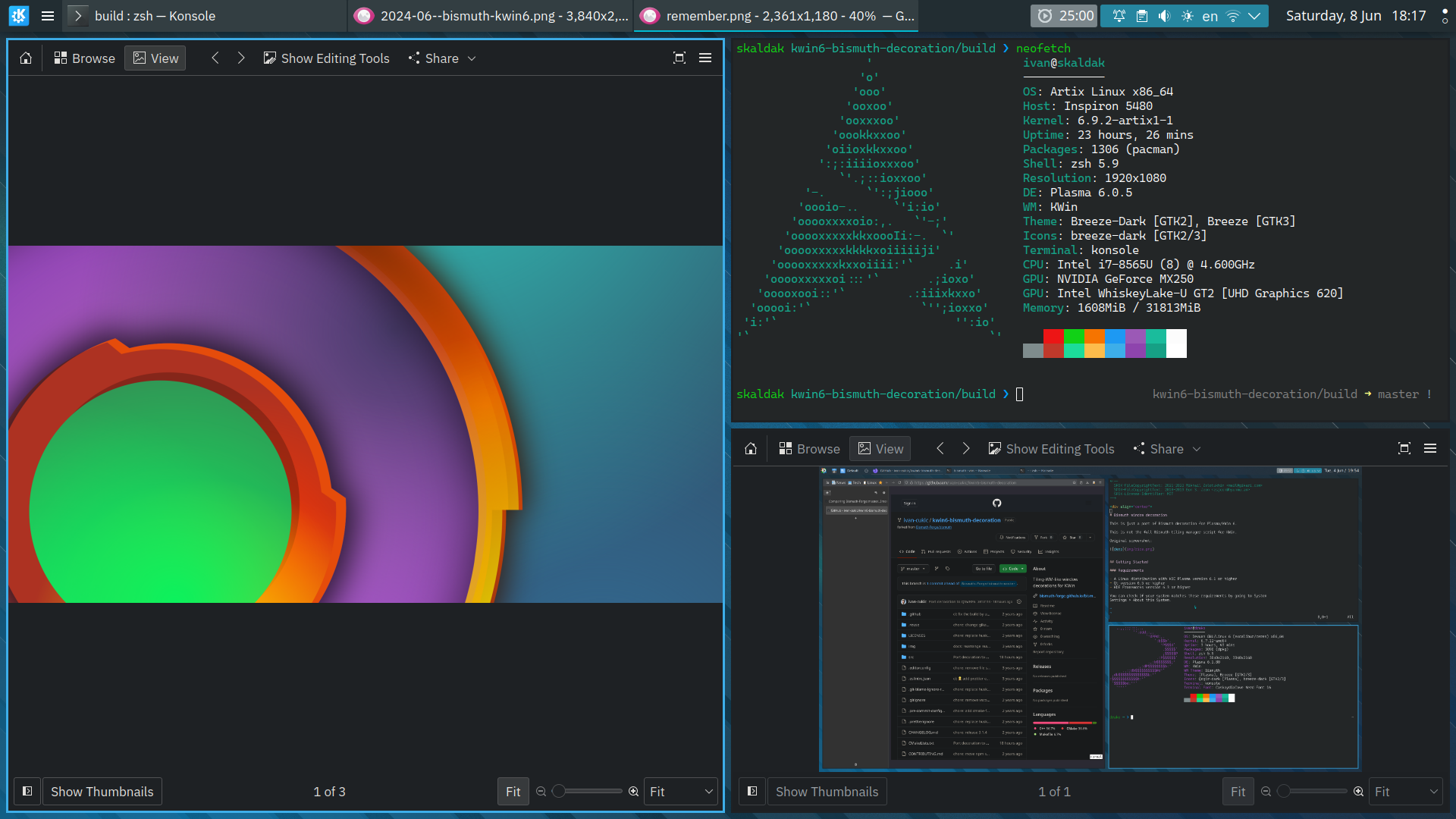
<p>The only thing missing was the simple ‘just a line around the window’
window decoration that Bismuth had.</p>
<figure>
<a href='/content/images/2024-06--bismuth-kwin6.png'><img src='/content/images-small/2024-06--bismuth-kwin6.png' alt='KWin 6 and Krohnkite + Bismuth decoration' /></a>
<figcaption>KWin 6 and Krohnkite + Bismuth decoration</figcaption>
</figure>
<p>Now we have that as well, I’ve ported the original Bismuth window
decoration to KWin 6 (nothing huge, just a few tiny changes to make it
compile). The code, and the installation instructions are available on
<a href="https://github.com/ivan-cukic/kwin6-bismuth-decoration"
target="_blank" rel="noopener noreferrer">github</a>.</p>

<!--
<div class="patronage">
<hr />
You can support my work on <a href="https://www.patreon.com/bePatron?u=9289140">Patreon</a>,
or you can get my book <a href="https://cukic.co/to/fp-in-cpp">Functional Programming in C++ at Manning</a> if you're into that sort of thing.
</div>
-->

]]></summary>
</entry>
<entry>
    <title>Marco Arena's series on SObjectizer</title>
    <link href="https://cukic.co/2024/02/17/marco-sobjectizer" />
    <id>https://cukic.co/2024/02/17/marco-sobjectizer</id>
    <published>2024-02-17T12:05:35Z</published>
    <updated>2024-02-17T12:05:35Z</updated>
    <summary type="html"><![CDATA[<p>Some time ago, Marco started a series of articles on SObjectizer. It
is starting to become <strong>the</strong> source for all things
SObjectizer – it is currently at post number 19 – quite an
endeavour.</p>
<p>For those who haven’t met SObjectizer before, it is a framework for
writing concurrent applications which supports the actor model,
publish-subscribe…</p>
<p>EDIT: The series are available on <a
href="https://marcoarena.wordpress.com/2023/10/05/sobjectizer-tales-prelude/"
target="_blank" rel="noopener noreferrer">Marco’s blog</a> as well as on
<a href="https://dev.to/ilpropheta/series/24883" target="_blank"
rel="noopener noreferrer">dev.to</a></p>

<!--
<div class="patronage">
<hr />
You can support my work on <a href="https://www.patreon.com/bePatron?u=9289140">Patreon</a>,
or you can get my book <a href="https://cukic.co/to/fp-in-cpp">Functional Programming in C++ at Manning</a> if you're into that sort of thing.
</div>
-->

]]></summary>
</entry>

</feed>
