



At this year’s Akademy (the yearly conference and gathering of KDE), there were several talks about immutable Linux distributions born inside KDE. The first, and more covered in the news was KDE Linux, the distro with an officially sounding name. And the second one was KDE Neon Core, which sounds like a continuation of KDE Neon, but is quite independent of it.
Things shouldn’t come in twos. There needs to be another immutable KDE distro, so I’m announcing the …

Now, this is a bit of a joke.
This is not really going to be a new distribution (for real, not like KDE Neon claimed not to be a distribution back in the day :) ). I don’t have the expertise nor the time to make a distribution from scratch.
But, while listening to the presentations about KDE Linux and KDE Neon Core, I had the idea to see how many of the planned features for those distributions I could implement based on an already existing and quite popular distribution called … if you have a keen eye, you might have guessed based on the image above … NixOS.
Step 1: Immutability
At the crux of it, immutability (along with other related buzzwords) means that you can not have an update break your system. There are no half-updates, no mixing incompatible versions of packages, etc. And if something gets broken with the new version, you can always roll back your system to a previous version.
This comes out of the box with NixOS. It just does it in a different way to other distributions. Its package manager allows installation of as many versions of a single package as needed, and the user or a running application “sees” only the versions they are compatible with.
When you update your system, the old packages are still installed, and you can reboot the computer into the pre-update state (previous versions are called generations).
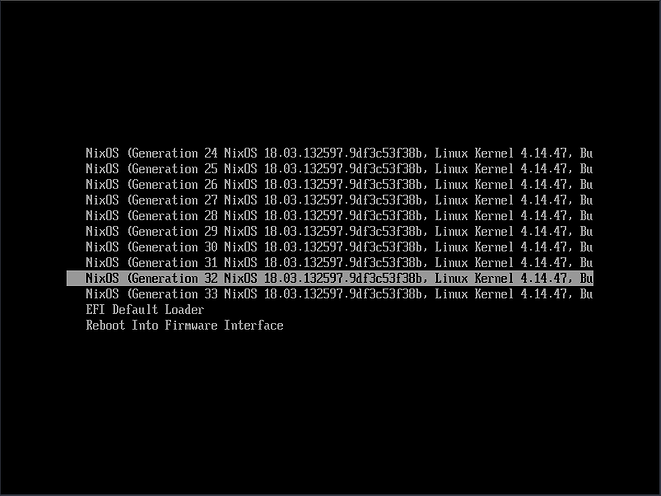
Booting into an old state doesn’t really do anything special, it just makes you “see” the versions of the packages that were active in that version of your system. You don’t even need to reboot most of the time – if you see that a new version of LibreOffice doesn’t open your file correctly, and you want to try with the previous version, just ask Nix to launch the old version for you. The old version of LibreOffice is still on your system even if you’ve not booted into the system version (generation) it was installed on.
Steps 2..n
My main computer is (and always will be) Debian, but I’ve been using NixOS on my laptop for months now. And it works quite well.
As NixOS can be installed or replicated from a single configuration file, I plan to create a repository that will hold the definition of the system on my laptop (aka, the reference installation of KDE Ni! OS :) ) and to keep it updated while I go through each of the steps of simulating other distributions’ features.
This way, anyone who wants to have KDE Ni! OS on their computer will be able to install it by installing NixOS and using this file for system definition.
The next step will mainly be for developers – it will be about
replacing a system package with a version you (or somebody else)
developed. For example, if you want the Plasma Vault to behave a bit
differently, or to test a fix for a bug you found, any sane distribution
should allow you to do that easily, and without endangering the system
integrity (no sudo make install). So, KDE Ni! OS will have
to be able to do it as well.