Our amazing meta-meta-builder tool kde-builder (just
like its predecessor kdesrc-build) is indispensable if
you’re building many KDE things from source.
The only problem I have with it is that it is overly verbose. It
generates ~10 lines of text for each project it compiles. This requires
a lot of scrolling for people with a slight OCD (like me) that want to
keep track of everything built and everything that failed to build while
the tool is working.
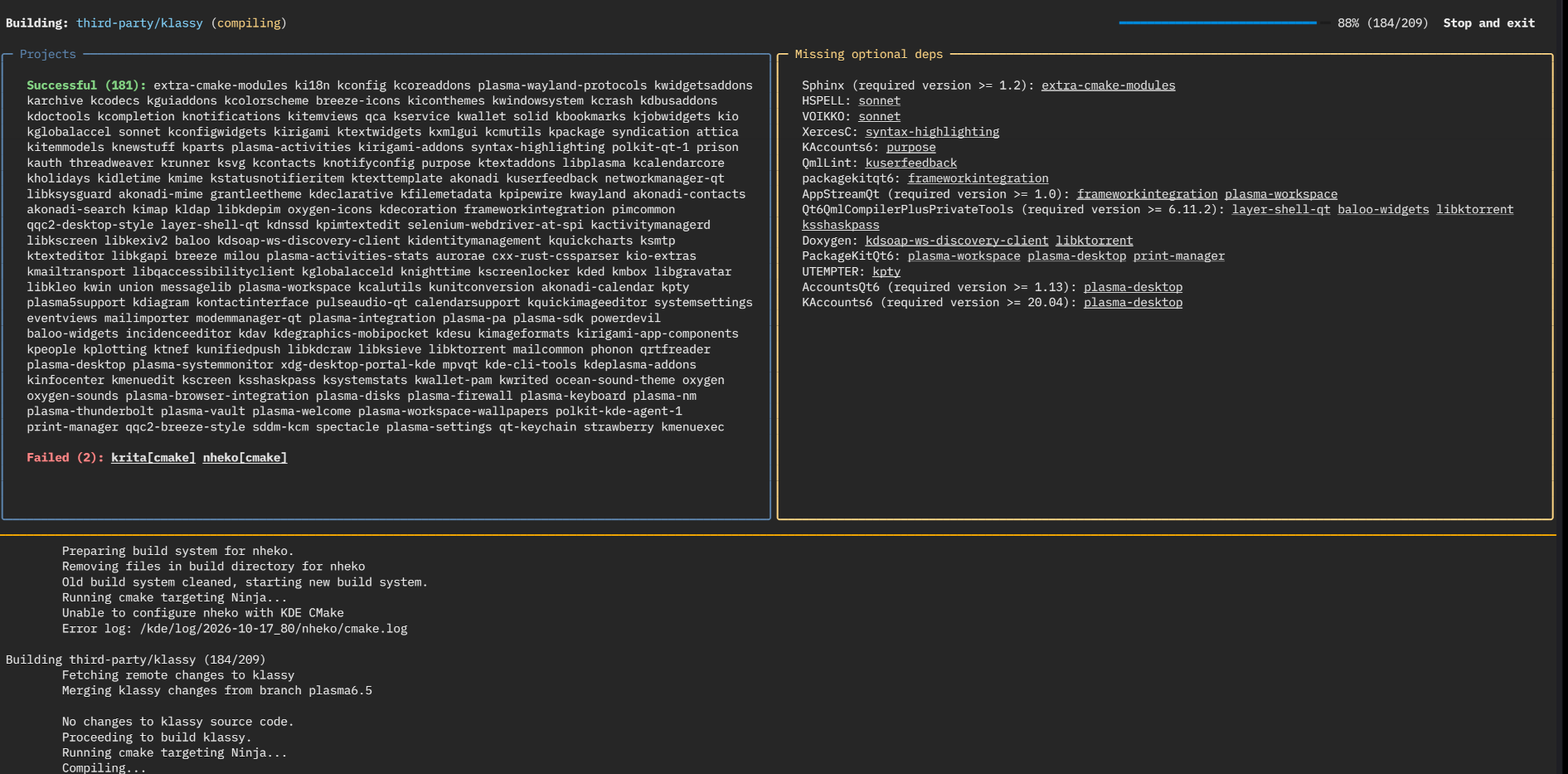
For this reason, I wrote a Python (go figure, me and Python) script
that processes the output from kde-builder and renders it
in a terse single-page dashboard.
KDE builder dashboard
The dashboard shows the project that is currently being built, a list
of projects that failed to build and a list of projects that were built
successfully. It also collects all optional dependencies that different
projects reported as missing and lists which projects have those
dependencies.
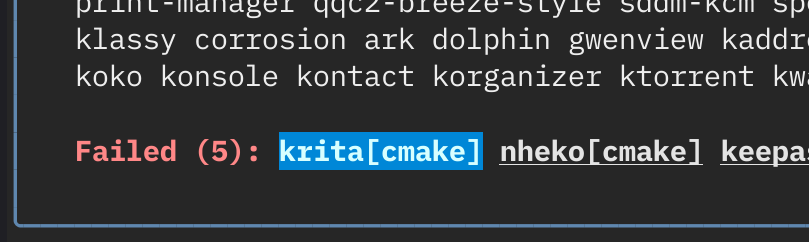
It also allows for an easy access to build logs – just click on the
failing project, and it will open its error.log in
$PAGER (in a separate TMUX tab if you are using TMUX).
Clickable build failures
Similar to this, if you click on a project that reported some
optional dependency, it will open cmake.log so that you can
see all the dependencies that project has.
Clickable dependency reports
I’ll publish it to invent when I clean up the code a
bit, and when I fix some of the remaining issues.
I’m getting old (though, not as old as the image below), and I miss
the good old days when using Linux was more difficult, but when every
system in a Linux desktop session was simple.
Excalibur (1981)
This was before polkit, systemd, … Even before DBus and PulseAudio.
All of these systems are cool and all, but I sometimes miss the
simplicity of “everything can be a shell script”.
I’ve been playing around with something that made me investigate how
the Plasma session is started, and if I can replicate it without
significant issues with a simple shell script or something else.
It turns out it is not that difficult of a process, just a bit
convoluted.
Your chosen display manager starts startplasma. A DBus
session is created and startplasmacompositor (and
kwin_wayland) is started. Then plasma_session
starts. And it starts kded6 and ksmserver.
There are a few other things that are started as well (like
kactivitymanagerd), but they are started
automagically by DBus when another component tries to use their
DBus API.
Moving to a shell script
In the old days, there was just a simple shell script called
startkde which set the environment variables and started
all the needed processes for a working KDE (and later Plasma) session.
It wasn’t pretty, it wasn’t efficient, but it did what it needed to.
Se I decided to try to reimplement a rudimentary version of that
script for the new Plasma.
These are the basic environment variables you’d want set before
running a Plasma session (or other UI applications):
I placed this into a seaprate script called env.sh as it
is useful for testing to be able to initialize the same environment in a
shell outside of startkde.
Apart from these, if you have some custom installation paths for Qt
or KDE things, you should also set PATH,
XDG_DATA_DIRS, XDG_CONFIG_DIRS,
QT_PLUGIN_PATH, QML2_IMPORT_PATH and
QT_QUICK_CONTROLS_STYLE_PATH.
If you have any custom environment variables defined in
~/.config/plasma-workspace/env, you should add them here as
well (or source all the files from that directory).
For the main script, just source env.sh, run
dbus-update-activation-environment --all and start all the
session components mentioned above:
source env.shdbus-update-activation-environment--allkwin_wayland--drm&KWIN_PID=$!sleep 1exportWAYLAND_DISPLAY=wayland-0kactivitymanagerd&ksmserver&kded6&plasmashell&krunner&# other things you want started along with Plasmawait$KWIN_PID
The sleep 1 is evil and there are better ways to check
if wayland-0 became available, but this is a quick and
dirty script after all. And the original startkde script
also had some sleeps in it.
The only thing remaining is to create a session file that your
display manager can use, and you’re good to go
(/usr/share/wayland-session/shellscript-based-startplasma.desktop)):
This seems to work without important issues, it just skips the splash
screen which I can live without (wow, ksplashqml
is 15 years old…).
I didn’t test it for too long, as I quickly replaced this shell
script with a dinit-based setup, but more on that in the
next post.
EDIT: This post is not an encouragement to really do
this on your system. Some things might break. And you might notice the
breakage too late. For example, see David’s comment below – this will
likely break session restoration. But, as I don’t use session
restoration, this does not bother me.
Months ago, some distributions accidentally removed cryfs and encfs
from Vaults dependencies (temporarily). And some distributions are
removing them intentionally from their package repositories (at least,
for the time being).
It might be a good idea to switch your vaults to gocrtyptfs.
There is no automatic process for this, just create a new vault (it
will be gocryptfs-based – other backends have been removed from the UI
in the latest versions) and copy the data from the old one there.
Some context
To avoid users thinking there is something serious going on, this is
some background on changes:
Plasma Vault creation wizard supports only gocryptfs since plasma-vault/-/merge_requests/62 as it is
the most maintained upstream project, and to avoid “confusing the
users”.
Some distro packagers thought this means Vault no longer supports
cryfs and encfs and they removed them from the package dependencies.
This change was quickly reverted as there are existing users that
already have cryfs and encfs-based Vaults.
Some distros are cleaning up FUSE2-based file systems and going
FUSE3-only. Some of them ship a FUSE3-based CryFS, and some seem to be
waiting for an official FUSE3-supporting release (see
github.com/cryfs/cryfs/issues/419).
So, nothing important has happened. Your vaults are as safe as they
always were.
It is just that it might bring you a headache if the backend you use
for your vaults disappeared after you update your system.
And headaches for me when I get bug reports that Vaults no longer
support encfs or cryfs :)
KDE Ni! OS is a custom flavour
(configuration, not a separate distribution) of NixOS that showcases KDE software. It
builds on NixOS with the aim to reimplement the same features other
popular immutable distributions have, while providing a first-class KDE
Plasma setup.
The Plasma Login Manager support has been merged into Ni! OS.
If you want to use it, there are two prerequisites:
you are using Wayland, not X11; and
you are on unstable NixOS.
It is in the “works for me” state. I don’t use auto-login,
virtual keyboard, etc.
Going unstable
If you are on the stable channel, which would surprise me as
you’re reading this post, it is easy to switch to unstable just
by running these commands as root user (sudo,
or su, or…).
This will switch you to the unstable version of NixOS.
Mind that, as NixOS is an immutable distribution, you can easily boot
back into the stable version – the previous version of your system is
still accessible in the bootloader menu.
Switching from
SDDM to the Plasma Login Manager
There’s a new option in Ni! OS called experimental.use_plasma_login_manager.
The only thing you need to do in order to switch from SDDM to the Plasma
Login Manager is to set it to true, and just
switch your setup to the new configuration with:
nixos-rebuild switch
Plasma Login Manager on Ni! OS
Switching back is also trivial – just change the value back to
false and do the switch again.
There and back again
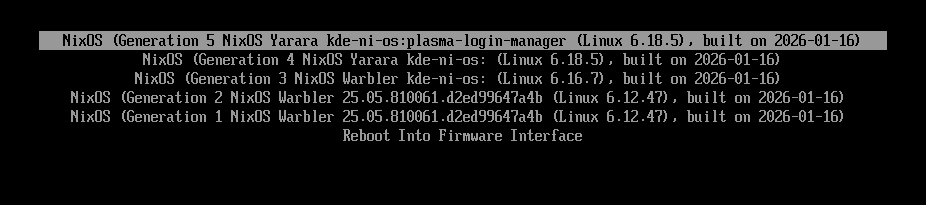
One new thing in Ni! OS is a custom label for the versions of the
system (derivations in NixOS terminology).
If you enable an experimental feature such as the Plasma Login
Manager, the label will clearly denote that. It makes it easy to get
back to a version without the experimental features enabled.
As you can see in the following screenshot, the default label is
kde-ni-os and all enabled experimental features are
appended to it – when enabling the Plasma Login Manager, the label
becomes kde-ni-os:plasma-login-manager. These labels can be
seen in the following screenshot:
Boot menu with labels shown
[edit] Upstream
Was notified by NixOS KDE maintainer K900, that PLM will officially
become a part of nixpkgs as Plasma 6.5.5 gets updated to 6.6.
KDE Ni! OS is a custom flavour
(configuration, not a separate distribution) of NixOS that showcases KDE software. It
builds on NixOS with the aim to reimplement the same features other
popular immutable distributions have, while providing a first-class KDE
Plasma setup.
Just a teaser this time.
I’ve read somewhere that Fedora will be the first distribution to
replace SDDM with Dave’s brand new Plasma Login Manager.
Will Ni! OS be the first non-distribution to do the same?
And if it does, will it become a distribution as it distributes yet
another package not available in vanilla NixOS? :)