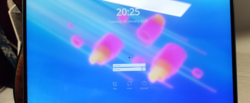





KDE Ni! OS is a custom flavour (configuration, not a separate distribution) of NixOS that showcases KDE software. It builds on NixOS with the aim to reimplement the same features other popular immutable distributions have, while providing a first-class KDE Plasma setup.
The Plasma Login Manager support has been merged into Ni! OS.
If you want to use it, there are two prerequisites:
- you are using Wayland, not X11; and
- you are on unstable NixOS.
It is in the “works for me” state. I don’t use auto-login, virtual keyboard, etc.
Going unstable
If you are on the stable channel, which would surprise me as
you’re reading this post, it is easy to switch to unstable just
by running these commands as root user (sudo,
or su, or…).
nix-channel --add https://channels.nixos.org/nixos-unstable nixos
nix-channel --update
nixos-rebuild switch --upgrade
This will switch you to the unstable version of NixOS.
Mind that, as NixOS is an immutable distribution, you can easily boot back into the stable version – the previous version of your system is still accessible in the bootloader menu.
Switching from SDDM to the Plasma Login Manager
There’s a new option in Ni! OS called experimental.use_plasma_login_manager.
The only thing you need to do in order to switch from SDDM to the Plasma
Login Manager is to set it to true, and just
switch your setup to the new configuration with:
nixos-rebuild switch
Switching back is also trivial – just change the value back to
false and do the switch again.
There and back again
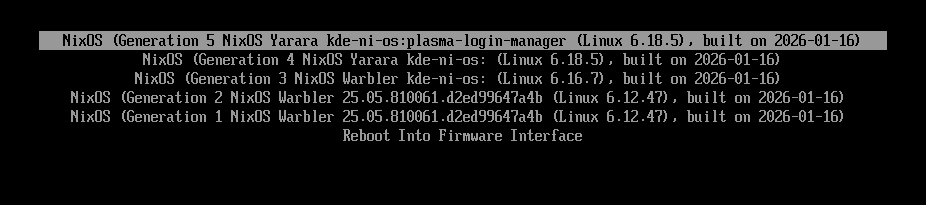
One new thing in Ni! OS is a custom label for the versions of the system (derivations in NixOS terminology).
If you enable an experimental feature such as the Plasma Login Manager, the label will clearly denote that. It makes it easy to get back to a version without the experimental features enabled.
As you can see in the following screenshot, the default label is
kde-ni-os and all enabled experimental features are
appended to it – when enabling the Plasma Login Manager, the label
becomes kde-ni-os:plasma-login-manager. These labels can be
seen in the following screenshot:
[edit] Upstream
Was notified by NixOS KDE maintainer K900, that PLM will officially become a part of nixpkgs as Plasma 6.5.5 gets updated to 6.6.
You can follow the progress of the patch here.
Once Plasma 6.6 is released, and it becomes available in nixpkgs, Ni! OS will start using the official package instead of my local hack.