Ok, this sounded a bit fancier than it is. This post is not about
what the future phones might look like,
but rather about something related to touch-based UIs (or to use the
fancy term UX :)) that has bothered me for a while now.
Preamble: To be honest, I haven’t had much opportunity to use various
touch devices apart from my Symbian S60v5, and I’ve played a bit with
Androids. With that said, I have really no clue whether the ideas
presented here are implemented somewhere, but I haven’t seen them.
Current gestures
This part is a bit ranty, so feel free to jump down to the next
section. :)
When touch-based devices went world-wide, the most touted thing was
how natural the UI was. Palm WebOS closes the apps when (IIRC)
you drag them down, iOS uses pinch zooming, etc.
While I have nothing against these concepts, they work quite well,
let us consider how natural those actually are.
Get a pen and a notebook. When you finish writing, do you drag the
notebook down from your desk? No, you close it, and put it away.
Open your photo album, and take one photo out of it. Put it on the
table. Put your index finger in the centre and the thumb somewhere else
on the photo. Try to zoom it by stretching.
So, please stop using the word natural and replace it with
‘intuitive’ (which, again, can be debatable, but can’t be considered as
plain wrong).
Guided gestures
So, the gestures are useful to make some tasks quicker. The thing
that I want to be able to do faster is to chose a contact and call
it/send sms without the need to ‘click’ more than once. The gestures
could be ‘drag contact up to call’, ‘drag contact down to send sms’. But
that is not really intuitive.
Enter guides:
Mobile Concept 1 - Contact dashboard
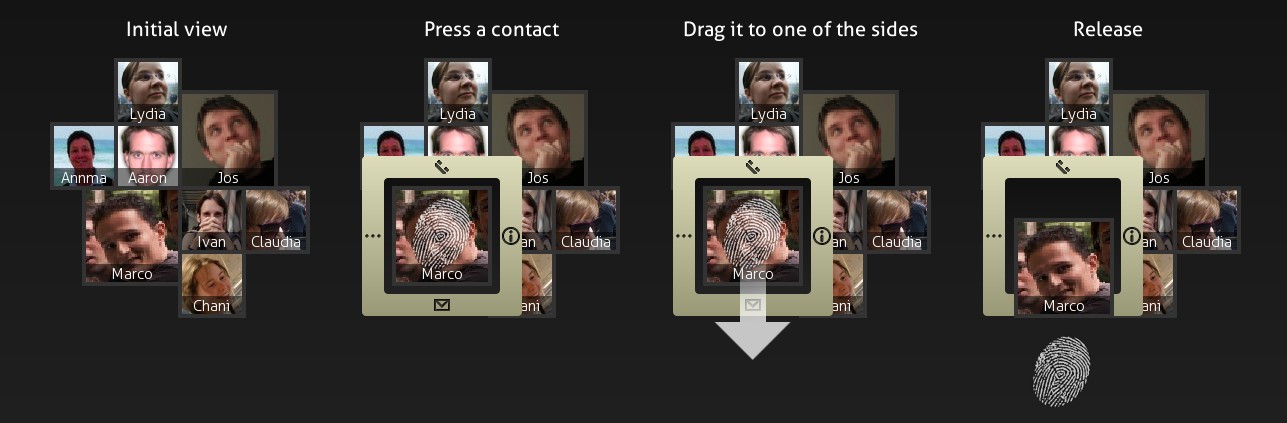
The picture mostly says it all, but here’s a short synopsis - you
have your favourite contacts placed on the dashboard of some sorts.
Every contact gets a size proportional to how much you did contact
him/her. Other contacts are automatically added if you have unanswered
calls from them, or sms messages.
When you touch the screen, the guides appear - in this case you have
4 actions - call (up), sms (down), info (right), more (left). If you
want to send an sms, just move your finger down and release it.
Mobile Concept 2 - Message List
Now, the same for the message list. Dragging up/down behaves as
expected - list gets scrolled. But when you drag to left/right, you get
two commonly used actions - ‘delete’ and ‘forward’ (replying is embedded
in the bottom of the window - not shown in the picture).
When you touch one of the messages, you get the icon guides. When
dragging the item to one of the sides, the icon for that action becomes
less transparent, and so does the tooltip - as a visual indication of
how much you need to drag the item to perform the desired action.
QML
Just to note that these are not mockups - all UI is implemented using
QML - it is not yet connected to real data, but the widgets are as real
as they get. :)
I’ve made Fedora branded stripes to submit it for potential inclusion
in F15. Unfortunately, Mairin (the famous Fedorartist) explained that
wallpapers need to be published under a free license, and since mine
contained Fedora logo, it can’t be (that is, Fedora logo is TMed).
So, because I didn’t want to really throw away what I made, I made it
into a generic wallpaper dedicated to the infinity symbol. The nice
thing is that due to the distortion, it still resembles an ‘f’, so for
all you who requested a Fedora-branded Stripes, you can use this.
It is similar to the original Stripes with a bit stronger shade of
blue.
Stripes: Infinity
Implications
This means that no further distro-branding will occur unless one of
the following conditions are met:
I get an official request
The logo is published under GPL or similar license
For the second, if you use a distro that has it (for example, they
ship with a replacement for a KDE icon that has a distro logo on the
blue rectangle KDE logo used to be on), please give me a nudge.
Gnome 3 stripes
Well, I guess most of you saw screenshots of G3 and saw their version
of stripes (the default wallpaper). It is fun that both KDE Stripes, and
Gnome stripes were created (approximately) at the same time and (for me)
truly represent the differences between KDE and Gnome artwork (like
Oxygen icons vs Gnome’s).
Owl
I’ve got quite a few distro related requests. Some of them were made,
some not yet. If you sent me a request, and you didn’t get the
wallpaper, please send it again since I lost my mail archive.
I remember there was one distro with an owl as a logo, but I don’t
remember the name :( … for others, I don’t even remember the logos.
So, the Calligra announcement raised some
eyebrows, and made big waves all across the world.
I guess you’ve seen a lot of articles lately that say things
equivalent to “no more pasta with cheese and garlic, end of KDE?”. I
guess it is /that/ time of the year again. When people have nothing to
write about, they need to invent or /beautify/ the news.
And that, my children, that is called “journalism”.
The thing that always fascinated me is that people
really like reading these things. You can’t imagine how
many page hits I got when I posted a spoof of OS market share statistics
with this post -
“Linux and Firefox market share - the reality” (well, unfortunately,
neither can I because my WP stats got wiped in the meantime, but it was
rather big :) )
The conclusion: Orwell’s 1984 is not about communism and monitoring
people…
p.s. I intentionally left out the links to the posts I’m referring to
here, as they really don’t need any more publicity…
Ok, I’ve realized I really don’t have the time to finish some of the
things I’ve started before. Too many things on my plate both in KDE
world and outside.
Because of this unfortunate situation, I’ve decided to give the theme
creation up to the community. I’ve submitted the themes in question to
gitorious at http://www.gitorious.org/kde-plasma-themes.
So, if you want to help, just clone the repository and start creating
art. I would ask you not to fork the themes, but improve these ones -
just make merge requests and I’ll accept them as soon as possible. Don’t
forget to add yourself to the list of authors.
If you prove to be a serious contributor, you’ll get direct commit
permissions to the whole repo.
git.kde.org
If you’re wondering why I didn’t use git.kde.org but Gitorious, the
main reason is that the repo was created long before git.kde.org was
even in plans, and I just haven’t blogged about it.